polish language
english language
 
How do I perform the software licensing audit for a given license?

According to the principle of the software licensing audit performed in SoftwareCheck, you have to enter the information about proofs of purchase (invoices, suppliers, original data carriers, etc.) and the quantities of legally used applications and link them to the products detected on the workstations.


Rozmiar: 81026 bajt򵠾</A>
 
<BR>
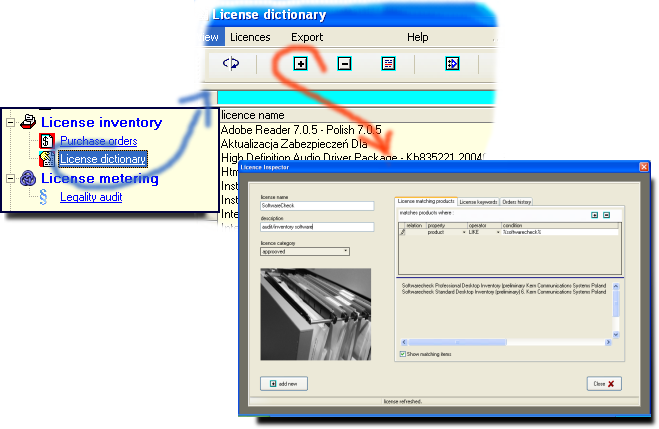
<LI>Enter the name of the audited license to the License Dictionary:
<BR>
<IMG SRC=
  • Specify the rules according to which this license will be linked to the installed applications detected on the workstations:
    Rozmiar: 22800 bajt򵠾
<BR><I>In this picture: all applications whose name contains the word
  • You can define any number of such conditions for one license, which will make automatic association even more precise.
    At the bottom of the window, the currently detected applications that meet the specified criteria are displayed.
    Rozmiar: 27687 bajt򵠾
<BR><BR><I>In this picture: for the


  • Open the window of proofs of purchase - so-called purchase orders. ("Purchase orders").
    Rozmiar: 27687 bajt򵠾
</A>
<BR CLEAR=
  • Enter the name of the order, purchased quantities, type of purchase.
    Rozmiar: 27687 bajt򵠾
<BR><BR><I>In this picture: the fact of purchasing 1 EULA license of the

  • Indicate the license in the License Dictionary (see Item 1) that this particular purchase refers to.
    Rozmiar: 27687 bajt򵠾</A>
<BR><BR><I>In this picture: the fact of purchasing 1 EULA license of the

  • SoftwareCheck will compare the entered information with the information about the software applications detected on the workstations.
    Rozmiar: 27687 bajt򵠾</A>
<BR CLEAR=

    In this picture:
    The status of the "SoftwareCheck Professional"" license is displayed:
    • installed - installed in the network: 1 piece (detected by SoftwareCheck and linked to the license according to a predefined rule)
    • purchased - purchased: 1 piece (entered in the database of Orders)
    • statement - balance: 0 pieces (installed# minus purchased#)
  •    
    Send your question:


    Your e-mail address:

    Start      Benefits      Details      Demo      Offer      Contact
    Copyright © 2008 KERN Communications Systems Poland. All rights reserved.