polish language
english language
 
How do I audit the license installation keys of MS Office and Windows?

The SoftwareCheck scanner can retrieve serial numbers and installation keys of MS Office and Windows. Those keys have been stored/coded on every workstation during the installation of particular components of the operating system or the MS Office suite. The control of appropriate use of keys granted to every workstation and their rational utilisation enables simple implementation of further upgrades and meeting the licensing requirements specified by Microsoft.


You can check product installation keys in 3 ways:

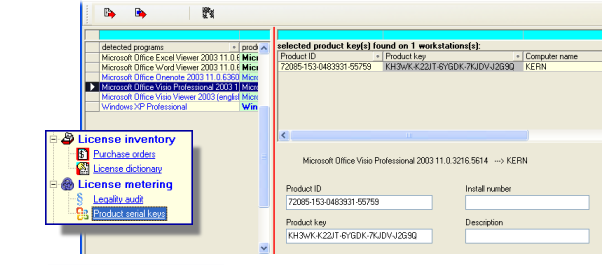
List of licensed MS Office and Windows components.

It shows what components have been detected in the company (the list on the left) and which serial keys are used on which workstations (the window on the right) Rozmiar: 81026 bajt򵠾</A>
<br>
Having selected the appropriate product (on the left) and the workstation (on the right), you will see the details of this particular installation. 
<BR><BR>


<p class= Equipping each workstation with licensed MS Office and Windows products.
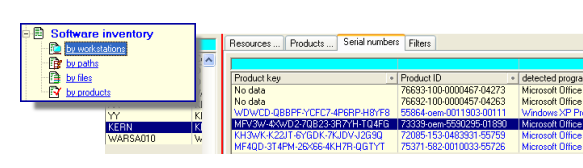

You can see the list of workstations (on the left) and the serial keys that have been detected on them (the window on the right).
Rozmiar: 81026 bajt򵠾</A>
<br>
Having selected the appropriate workstation (on the left), you will see all serial keys detected on it.
<BR><BR>
<BR CLEAR=

Audit Summary: cloned license keys.

You can see a list of serial keys cloned on several workstations, which can indicate problems with software licensing.
Rozmiar: 81026 bajt򵠾</A>
<br>
Master:  the list of cloned license keys<BR>
Detail: the list of workstations with cloned license keys
	 
	 
</TD>
     </TR>
	 
	 
<TR>
	<TD><FONT  class=

   
Send your question:


Your e-mail address:

Start      Benefits      Details      Demo      Offer      Contact
Copyright © 2008 KERN Communications Systems Poland. All rights reserved.